
Unlock Smart Home Magic with WiFi Scene Switches
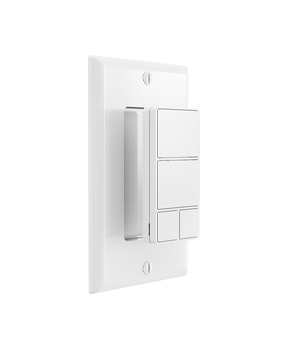
Enter WiFi scene switches: the unsung heroes of home automation. These handy gadgets simplify your life by putting control of multiple smart devices at your fingertips—literally. Let’s explore how they work, why they’re a game-changer, and how you can make the most of them.
What Are WiFi Scene Switches?
Imagine having a single button that dims your lights, lowers the blinds, and starts your favorite playlist—all at once. That’s the power of a WiFi scene switch. Unlike traditional switches, these devices connect to your home WiFi network, letting you control or automate groups of smart gadgets with a single tap or voice command.
Key Features:
-
Control multiple devices (lights, plugs, thermostats) from one switch.
-
Create custom “scenes” for different moods or routines.
-
Integrate with voice assistants for hands-free operation.
Why You’ll Love WiFi Scene Switches
Still on the fence? Here’s why these switches are worth the hype.
1. Effortless Convenience
Why juggle multiple apps or remotes when you can press one button? For instance, a “Goodnight” scene can turn off lights, lock doors, and adjust the thermostat—saving you time and hassle.
2. Energy Savings Made Simple
Forgot to turn off the bedroom light? No problem. Use your WiFi scene switch to power down all devices remotely. Over time, this habit can trim your energy bills and reduce waste.
3. Customization for Every Lifestyle
Whether you’re hosting a movie night or prepping breakfast, tailor scenes to match your routine. Adjust brightness, colors, and device combinations to fit your needs perfectly.
How Do WiFi Scene Switches Work?
Curious about the tech behind the magic? Let’s break it down.
Step 1: Connect to Your Network
First, sync the switch to your home WiFi through a companion app. This step usually takes minutes and requires no technical expertise.
Step 2: Pair with Smart Devices
Next, link the switch to compatible gadgets like bulbs, speakers, or security cameras. Most switches work with popular smart home ecosystems, ensuring seamless integration.
Step 3: Create & Activate Scenes
Finally, design scenes in the app. Tap the switch or use a voice command to trigger them instantly.
Creative Ways to Use WiFi Scene Switches in Your Home
Ready to get inspired? Here are some practical ideas.
1. Elevate Your Living Room
-
Movie Mode: Dim lights, close blinds, and power on the TV.
-
Party Time: Brighten rooms, play upbeat music, and activate colorful lighting.
2. Simplify Morning Routines
-
Wake-Up Scene: Gradually brighten lights, brew coffee, and read out the day’s weather.
3. Enhance Home Security
-
Vacation Mode: Randomize lights and blinds to deter intruders while you’re away.
Choosing the Right WiFi Scene Switch for Your Needs
Not all switches are created equal. Keep these factors in mind:
Compatibility Matters
Ensure the switch works with your existing smart devices. Look for support for common protocols like Zigbee or Z-Wave if needed.
Design and Accessibility
Opt for a sleek, intuitive design that blends with your decor. Touch panels, physical buttons, or rotary dials offer different tactile experiences.
App Features
A user-friendly app makes setting up scenes a breeze. Prioritize switches with scheduling options and remote access.
Final Thoughts: Simplify Your Life with Smart Control
WiFi scene switches are more than a trendy gadget—they’re a practical upgrade for any home. By streamlining device control, boosting energy efficiency, and letting you personalize every corner of your space, these switches put you in charge.



